WiFi Solutions Malaysia | Enterprise Wireless Network Installation – RYZEN Esolutions
Enterprise WiFi Specialists Malaysia

Enterprise WiFi Solutions Malaysia

ArubaRuijieTP-Link OmadaWiFi 6Seamless RoamingMesh NetworkGuest Portal

RYZEN Esolutions designs and installs enterprise WiFi for offices, hotels, warehouses, schools and factories across Malaysia. Site survey, heatmap analysis, seamless roaming and ongoing support.

500+
APs Installed
15+
Years Experience
WiFi 6
Latest Standard
0ms
Roaming Drop
MOF
Certified
A–Z
Survey to Support
WiFi Controller β€” Live View 12 Clients Online
πŸ“ Office Floor Plan β€” WiFi Coverage ● Live Heatmap
AP-01 Β· Lobby
5 GHz Β· WiFi 6
Clients: 4  |  ● Online
AP-02 Β· Office
5 GHz Β· WiFi 6
Clients: 5  |  ● Online
AP-03 Β· Meeting
2.4 GHz Β· WiFi 5
Clients: 3  |  ● Online
Connected Devices12 Online
πŸ’»MacBook Pro Β· AP-02
89Mbps
πŸ“±iPhone 15 Β· AP-01
54Mbps
πŸ–₯️PC-Finance Β· AP-02
120Mbps
WiFi Solutions MalaysiaAruba Instant On MalaysiaRuijie WiFi MalaysiaTP-Link Omada MalaysiaWiFi 6 MalaysiaSeamless Roaming WiFiWiFi Heatmap MalaysiaGuest Portal WiFiEnterprise Wireless MalaysiaWiFi Site Survey KL PJMesh Network MalaysiaWiFi Solutions MalaysiaAruba Instant On MalaysiaRuijie WiFi MalaysiaTP-Link Omada MalaysiaWiFi 6 MalaysiaSeamless Roaming WiFiWiFi Heatmap MalaysiaEnterprise Wireless MalaysiaMesh Network Malaysia
WiFi Brands We Deploy
πŸ“‘
Aruba
Instant On Β· HPE Aruba Central
πŸ“Ά
Ruijie
RG-AP Series Β· Reyee Mesh
πŸ”—
TP-Link Omada
EAP Series Β· SDN Controller
🌐
Ubiquiti
UniFi AP Β· UniFi Controller
⚑
Cisco Meraki
MR Series Β· Cloud Dashboard
Common WiFi Problems We Solve

Your WiFi Problems, Our Solutions

Slow WiFi, dead zones, no roaming, dropped calls β€” these are the exact problems RYZEN solves every day for Malaysian businesses.

❌ Problem
Slow WiFi throughout the office β€” buffering, lag, poor video calls
β†’
βœ“ Solution
Upgrade to WiFi 6 access points β€” 4Γ— faster speeds, less congestion
❌ Problem
WiFi signal drops when moving between floors or meeting rooms
β†’
βœ“ Solution
Deploy seamless roaming β€” devices hand off instantly with zero drop
❌ Problem
Dead zones in warehouse, factory floor or far corners of the office
β†’
βœ“ Solution
Site survey + heatmap design β€” AP placement eliminating all dead zones
❌ Problem
Guests sharing staff WiFi β€” security risk, bandwidth abuse
β†’
βœ“ Solution
Guest portal with bandwidth limits, VLAN isolation and time-limited access
What We Offer

WiFi Solutions We Provide

From single-room hotspot to multi-floor enterprise wireless network β€” RYZEN delivers the right WiFi solution for your environment and budget.

🏒
Office WiFi
Managed WiFi for offices of all sizes. Centralised controller, per-user policies, seamless roaming across floors and wings. Aruba, Ruijie or TP-Link Omada.
Managed APVLANRoamingController
🏨
Hotel & Hospitality
Per-room WiFi, guest portal with room number login, bandwidth management and PMS integration. Reliable coverage in lobby, pool, restaurant and all guest areas.
Guest PortalPer-RoomPMS LinkHotspot
🏭
Factory & Warehouse
Industrial-grade APs for high-ceiling warehouses, factories and outdoor yards. Ruggedised access points, long-range coverage and reliable connectivity for scanners and mobile workers.
Industrial APOutdoorLong RangeHigh Ceiling
🏫
School & Education
High-density WiFi for lecture halls, classrooms and student areas. Content filtering, per-SSID policies for staff vs students, and timed access control during exams.
High DensityContent FilterRole-BasedExam Mode
πŸ›’
Retail & F&B
Guest WiFi with branded login portal, customer engagement analytics and integration with loyalty systems. Staff network isolated from public WiFi at all times.
Branded PortalAnalyticsSocial LoginIsolated
πŸ—ΊοΈ
Site Survey & Heatmap
Professional wireless site survey with RF analysis, AP placement planning and coverage heatmap report. Ensures optimal coverage before any hardware is purchased.
RF AnalysisHeatmapAP LayoutFloor Plan
Our Process

From Survey to Go-Live

RYZEN follows a proven 5-step WiFi deployment process β€” ensuring your wireless network is designed right the first time, with zero guesswork.

01
πŸ“‹
Site Survey
On-site RF assessment, floor plan review and interference analysis
02
πŸ—ΊοΈ
Heatmap Design
Predicted coverage heatmap showing AP locations, signal strength and overlap
03
πŸ”Œ
Installation
Cat6 cable run, PoE switch, AP mounting and controller setup
04
βš™οΈ
Configuration
SSID, VLAN, roaming, guest portal, bandwidth and security policies
05
βœ…
Validation & Handover
Post-installation heatmap validation, user training and support handover
Seamless Roaming Demo ● Live Simulation
Zone A
Zone B
Zone C
πŸ“‘
AP-01
πŸ“‘
AP-02
πŸ“‘
AP-03
⚑ Handoff
0ms
Handoff Latency
802.11r
Fast Roaming
0 drops
Call Interruption
Auto
Band Steering
Seamless Roaming

WiFi Roaming Without Drops

Without seamless roaming, your phone disconnects and reconnects every time you walk past an access point. With RYZEN's properly configured WiFi, handoff is instant and invisible.

⚑
802.11r Fast BSS Transition
Industry standard for fast AP handoff β€” pre-authentication with target AP before disconnecting from current one.
πŸ“Ά
Band Steering (2.4 vs 5 GHz)
Automatically steers capable devices to 5 GHz for better performance, keeping 2.4 GHz clear for IoT devices.
🎯
Client Load Balancing
Distributes clients evenly across access points β€” prevents one AP from being overloaded while others sit idle.
πŸ“±
VoIP & Video Call Friendly
Zero-drop roaming means WhatsApp calls, Teams, Zoom and VoIP calls continue uninterrupted as you move around.
Who We Serve

WiFi for Every Environment

01
🏒
Corporate Office
Multi-floor seamless roaming, per-department VLANs, secure guest portal and centralised management for SMEs and corporates.
02
🏨
Hotel & Resort
Per-room access, branded guest portal, pool and restaurant coverage, PMS integration and bandwidth guarantee per guest.
03
🏭
Factory & Warehouse
Ruggedised outdoor APs, barcode scanner connectivity, forklift tracking and seamless coverage across 10,000+ sqft facilities.
04
🏫
School & Campus
High-density classroom WiFi, student vs staff SSID separation, content filtering and exam lockdown mode.
05
πŸͺ
Retail & F&B
Branded guest WiFi with WhatsApp/Facebook login, footfall analytics and loyalty platform integration.
06
πŸ›οΈ
Government & GLC
MOF-compliant procurement (357-0002398674). Secure classified and public WiFi separation, full tender documentation.
Real Projects

WiFi Installations We've Completed

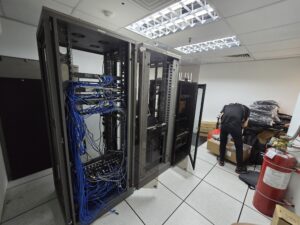
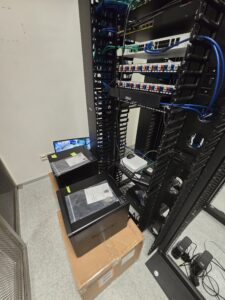
Every photo is from an actual RYZEN WiFi or network project across Malaysia.
Office WiFi Network Switch Setup Malaysia
WiFi & AP
Office WiFi Deployment
Network Switch Firewall Malaysia 2025
Network Switch
Network & Switch Config
Cat6 Cabling Patch Panel Malaysia
Cabling
Cat6 Patch Panel
Server Rack Cable Management Malaysia
Cabling
Rack Cable Mgmt
Network WiFi Cabling Malaysia Office
Network Switch
Office Network Setup
MDF Rack Neat Cabling Malaysia
Cabling
Neat Rack Cabling
Full Office IT Build WiFi Malaysia
WiFi & AP
Full Office WiFi Build
IT Infrastructure Network Malaysia 2025
Network Switch
IT Infrastructure 2025
FAQ

WiFi Questions

Do I need a site survey before buying WiFi equipment?+
Yes β€” strongly recommended. A site survey identifies interference sources, building material attenuation and optimal AP placement. Without a survey, you risk buying too few APs (coverage gaps) or too many (wasted cost). RYZEN provides free site surveys with a heatmap report showing predicted coverage before any purchase.
What is the difference between WiFi 5 and WiFi 6?+
WiFi 6 (802.11ax) is up to 4Γ— faster than WiFi 5 and handles more simultaneous clients much better β€” ideal for dense office environments. WiFi 6 also introduces OFDMA (better multi-user efficiency) and Target Wake Time (better battery life for IoT). For most new deployments, RYZEN recommends WiFi 6 access points.
Why do my devices keep dropping WiFi when I move around?+
This is caused by poor roaming configuration. Without 802.11r Fast Transition and proper RSSI thresholds, your device "sticky clients" to the original AP even when a stronger one is nearby. RYZEN configures seamless roaming properly β€” including 802.11r/k/v β€” so devices hand off instantly with zero disconnection.
How many access points do I need for my office?+
It depends on building size, construction materials and user density. As a rough guide: 1 AP per 1,000–1,500 sqft in standard concrete offices. High-density areas (meeting rooms, cafeterias) need more. RYZEN uses RF planning software to calculate the exact number and placement β€” no guesswork.
Can RYZEN set up guest WiFi separate from staff WiFi?+
Yes. RYZEN sets up separate SSIDs with VLAN isolation β€” guests cannot access your internal network, printers, servers or NAS. Guest WiFi can include a branded captive portal (login with password, mobile number OTP or social media), bandwidth limits and time-based access control.
Which WiFi brand is best β€” Aruba, Ruijie or TP-Link Omada?+
All three are good β€” the right choice depends on budget and scale. TP-Link Omada: best value for small-medium offices (50–200 users). Ruijie: excellent price-performance for larger deployments (200–2,000+ users) and popular in hotels. Aruba: premium enterprise grade for demanding environments. RYZEN will recommend the right brand after your site survey.

Still Getting Dead Zones?
Get a Free WiFi Site Survey Today.

We'll visit your site, map your floor plan and give you a free heatmap showing exactly where APs should go β€” before you spend a single ringgit.

Get In Touch

Free WiFi Site Survey

Tell us your floor size, number of users and problem areas β€” we'll come to your site and give you a free heatmap and recommendation.

WiFi Site Survey Request
⚠️

πŸ”’ Secure Β· Response within 30 minutes