

IP-PBX replaces a legacy phone system by moving calls from old dedicated hardware into software that runs on your network or in the cloud. Your main number and existing extensions transfer without a blackout, staff can answer from anywhere, and you stop paying for parts that no longer exist. The migration is planned to your schedule, not forced by a breakdown.
What's actually wrong with the old system?
That Panasonic KX-TDA or NEC SL1100 in your storeroom probably still works. But it's working on borrowed time. Spare cards are scarce. When a relay fails or a power spike hits during the monsoon, the parts needed are no longer manufactured. The engineer who installed it has retired or moved on. Even if Ryzen can repair it—and usually we can—you're not moving forward. You're just delaying the fall.
A legacy PABX ties your main number to a single box in a single room. If the power trips, or the equipment dies, customers ring into nothing. You can't work from home. Extensions don't follow people. Staff share phones instead of phone numbers.
How does IP-PBX work?
Instead of dedicated telephone hardware, your phone system lives as software on the network. Calls come in over your internet line (or a carrier's SIP trunk) and are routed by a server or cloud platform. Extensions aren't tied to desks—they're tied to people. A staff member can answer the main line from their laptop, their mobile, or a desk phone, wherever they are.
The setup is simpler than it sounds. Your existing phone numbers and extension patterns transfer over. Callers notice nothing. Your staff see the same dial pad they're used to, but with more flexibility.
Do you have to replace everything at once?
No. Most businesses don't. If your Panasonic or NEC system is still running reliably, Ryzen can service and maintain it while you plan the migration at a pace that suits your budget and workflow. A planned move costs far less than an emergency cutover on the day the old box fails.
When you are ready, the migration happens in stages. New handsets, softphones on laptops, and cloud infrastructure go live in parallel with the old system. The cutover itself is controlled—your main line stays answered at every step. We've learned this the hard way: the paperwork with the carriers has to be exact, but when it is, there's no silence.
Cloud or on-premise: which wins?
Both have honest answers. Cloud PBX suits you if your team is spread across sites, you're working hybrid, or you want predictable monthly billing with no hardware to maintain. On-premise still wins if you run a high call volume through local queues, or if your internet connection is unreliable—because the system keeps working if the internet goes down.
Ryzen operates both types and will show you the five-year numbers for your actual call patterns. That's how you decide, not from a vendor's marketing story.
What happens to your phone number and extensions?
- Your main line number ports to the new system without the customer ringing into a void
- Extension numbers stay the same so staff don't have to relearn anything
- Calls to your old extensions automatically route to the right person, even if they're working from home or a different site
- The switch is managed so both systems work in parallel for a few hours, then you cut over when everyone's ready
What about the phones on desks?
You don't have to replace them all. Modern IP phones (handsets designed to work over your network) are affordable and work with both cloud and on-premise systems. But you also get softphones—an app on a laptop or mobile—that rings with your office extension. A Jabra UC controller or conference phone brings video calls and meeting audio into the same system, so there's one interface instead of three.
The call flows—IVR menus, queues, voicemail, call recording—are configured around how you actually answer the phone. Ryzen watches a real week of traffic, then tunes it.
When you don't need this
If your Panasonic or NEC system is new or recently serviced, and your team all works from the same building, and you're not planning any changes in the next three years, staying put is reasonable. But the moment you open a second site, or staff start working hybrid, or parts become hard to find, IP-PBX stops being optional and starts being inevitable. And doing it on your schedule costs less than doing it in a crisis.
If you have questions about whether migration makes sense now or later, contact Ryzen for a free consultation. We'll look at your current system, your growth plans, and your budget, and tell you what's actually sensible. You can also browse our IP-PBX service page for more detail on what we offer.
Products for this job
Hardware and licences are supplied through our sister shop PrinterBullet. Prices are today's.
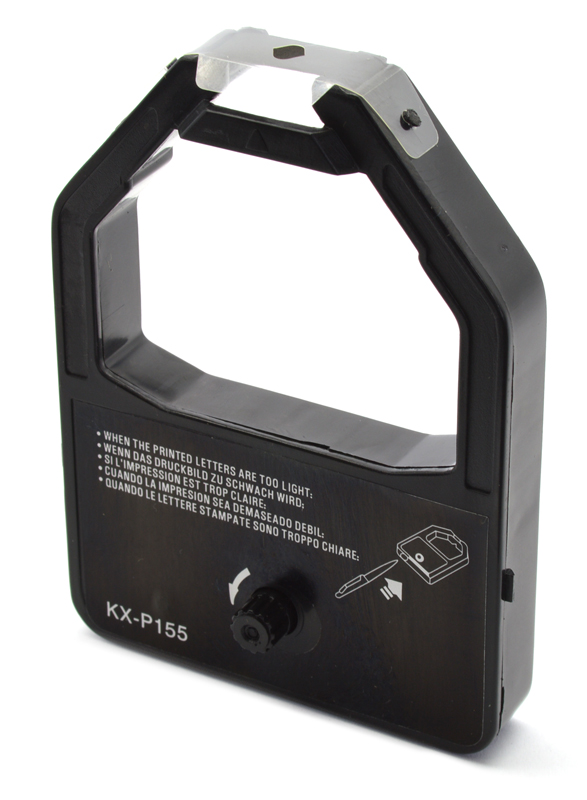 Compatible Panasonic KXP-155 Black Fabric Printer Ribbon
RM 10.80
 Jabra Speak 510+ MS (7510-309)
RM 1,100.00
 Jabra Speak2 75 UC (2775-209)
RM 1,800.00
 Jabra Evolve 80 LINK UC Controller, without Headset (14208-06)
RM 390.00
Frequently asked questions
Can I keep my current phone number when I switch to IP-PBX?
Yes. Your existing number ports to the new system without interruption. The handover is sequenced so callers never reach a dead line. Carrier paperwork is exact, but the process is proven. Extensions also remain the same.
What happens if my internet goes down with cloud PBX?
Cloud systems can be set to failover to mobile apps or a backup connection. On-premise PBX keeps running even if the internet is down, which suits call-heavy operations. Ryzen can design either to match your reliability needs.
Do I need new phones when I switch to IP-PBX?
Not immediately. Modern IP phones are affordable and optional. Softphones on laptops and mobiles let staff answer the main line from anywhere. You add hardware as budgets allow, without delaying the migration.
Can Ryzen repair my old Panasonic or NEC system?
Yes. Most faults in Panasonic KX-TDA/TDE/NS and NEC SL1100/SV8100/Aspire systems are diagnosable and repairable long after end-of-life. Ryzen offers fault diagnosis, card-level repair, handset replacement, and preventive maintenance visits to avoid emergency breakdowns.
How long does an IP-PBX migration take?
Planning and testing typically take four to eight weeks, depending on your site complexity. The actual cutover happens in a few hours when everyone is ready. Ryzen runs both systems in parallel to minimise risk and staff disruption.
Talk this through with an engineer
Free, technical, and specific to your site — that's the consultation.
Book a Consultation